

Which Is Right for Your Business?
Meta Description:
Not sure whether your business needs co-managed IT or fully managed IT? Learn the key differences, benefits, costs, and how to choose the right IT support model.
Co-Managed IT vs. Fully Managed IT: Which Is Right for Your Business?
When evaluating IT support, one of the biggest decisions you’ll make is whether to outsource your technology completely or partner with an IT provider to support your existing team.
The right answer depends on your business, your internal IT resources, and your long-term goals.
Fully Managed IT is ideal for businesses that want a single partner to handle all aspects of their technology—from help desk support and cybersecurity to strategic planning. Co-Managed IT, on the other hand, is designed for organizations that already have internal IT staff but need additional expertise, resources, or coverage.
In this guide, we’ll explain the differences, the advantages of each approach, and how to determine which model best fits your organization.
What Is Fully Managed IT?
With a fully managed IT model, your Managed Service Provider (MSP) becomes your complete IT department.
Your provider is responsible for the day-to-day management of your technology, including:
- Help desk support
- Device monitoring
- Cybersecurity
- Microsoft 365 administration
- Backup and disaster recovery
- Network management
- Vendor coordination
- Strategic IT planning
- Technology budgeting
- User onboarding and offboarding
For most small and medium-sized businesses without dedicated IT staff, this model provides predictable costs and access to a broad range of technical expertise.
What Is Co-Managed IT?
Co-managed IT is a partnership between your internal IT team and an external Managed Service Provider.
Instead of replacing your IT staff, the MSP complements their capabilities.
This model is ideal for organizations that:
- Have one or more internal IT professionals
- Need specialized cybersecurity expertise
- Require after-hours support
- Need help with Microsoft 365 or cloud technologies
- Want assistance with large projects
- Need additional resources during vacations or staff shortages
Your internal IT team retains control while leveraging the MSP’s tools, experience, and additional personnel.
Key Differences Between Co-Managed and Fully Managed IT
| Feature | Fully Managed IT | Co-Managed IT |
| Daily Help Desk | MSP | Shared |
| User Support | MSP | Internal IT + MSP |
| Strategic Planning | MSP | Collaborative |
| Cybersecurity | MSP | Shared Responsibility |
| Projects | MSP | Shared |
| Vendor Management | MSP | Shared |
| Internal IT Staff | Not Required | Required |
| Best For | Businesses without IT staff | Businesses with existing IT teams |
Neither model is inherently better. The right choice depends on your business structure and goals.
Benefits of Fully Managed IT
Fully managed IT is often the best choice for businesses that want a single point of accountability.
Benefits include:
- Predictable monthly costs
- Access to a full team of specialists
- Reduced downtime
- Stronger cybersecurity
- Simplified vendor management
- Strategic technology planning
- Faster response times
- No need to recruit or retain in-house IT staff
This allows business owners and managers to focus on growth rather than technology issues.
Benefits of Co-Managed IT
For organizations with internal IT resources, co-managed IT provides flexibility without replacing existing staff.
Benefits include:
- Additional technical expertise
- Access to enterprise-grade tools
- Enhanced cybersecurity capabilities
- Project support
- Vacation and after-hours coverage
- Reduced burnout for internal IT staff
- Strategic consulting
- Faster resolution for complex issues
Rather than duplicating effort, the MSP fills skill gaps and expands your team’s capacity.
When Does Co-Managed IT Make Sense?
Co-managed IT is often the right choice if your organization:
- Has an IT manager who wears many hats
- Needs help with cybersecurity compliance
- Is migrating to Microsoft 365 or Azure
- Has grown beyond the capabilities of a small IT team
- Needs access to specialized expertise without hiring additional employees
- Wants to improve resilience while maintaining internal control
Many growing businesses discover that hiring another full-time IT professional is more expensive than partnering with an MSP.
When Is Fully Managed IT the Better Option?
Fully managed IT is typically the best fit if:
- You don’t have dedicated IT staff
- Technology issues distract employees from their work
- Cybersecurity is becoming more complex
- You want predictable monthly costs
- Your business is growing quickly
- You need a trusted technology advisor
Instead of juggling multiple vendors and contractors, you gain a single partner responsible for your entire IT environment.
Cost Comparison
Pricing varies depending on the level of service, but generally:
Fully Managed IT
- Typically priced per user, per month
- Includes proactive monitoring, support, cybersecurity, and strategic planning
- Best suited for organizations looking to outsource day-to-day IT operations
Co-Managed IT
- Often customized based on the services required
- May combine per-user pricing, project work, or retainer agreements
- Designed to complement—not replace—your internal IT team
Because every organization has different needs, the best way to compare costs is to evaluate the value each model provides rather than focusing solely on monthly fees.
Real-World Example
Imagine a manufacturing company with 75 employees and one internal IT manager.
The IT manager handles daily support but struggles to keep up with cybersecurity, Microsoft 365 administration, and infrastructure projects.
By partnering with a co-managed IT provider, the company gains:
- 24/7 monitoring
- Advanced cybersecurity tools
- Project assistance
- After-hours support
- Strategic IT planning
The internal IT manager can focus on business initiatives while the MSP provides specialized expertise and additional capacity.
How to Choose the Right Model
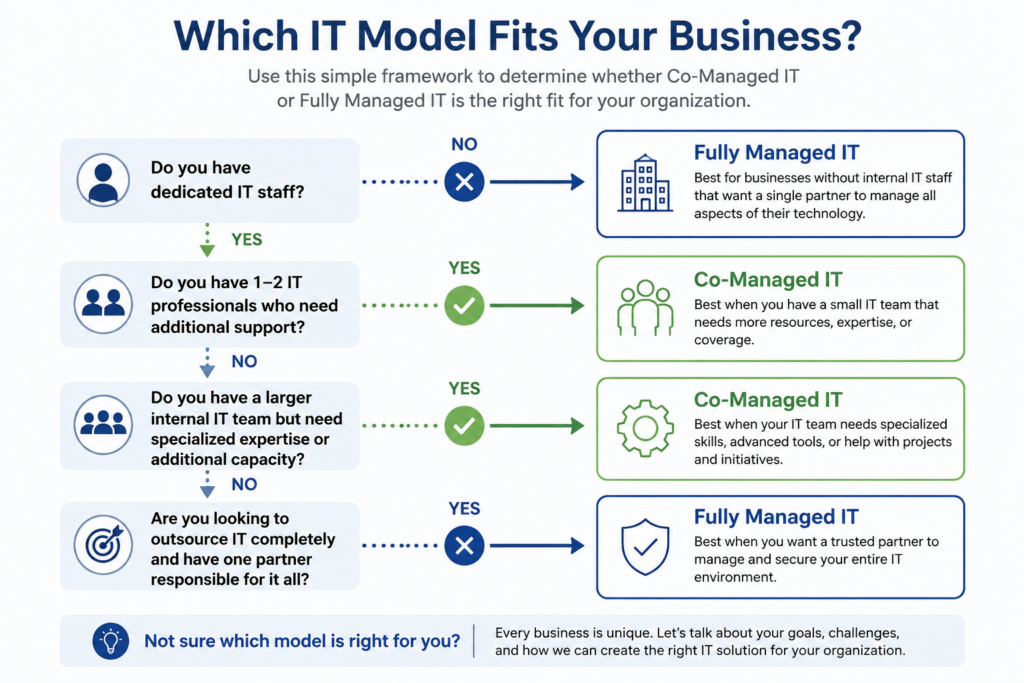
When deciding between co-managed and fully managed IT, ask yourself:
- Do we have dedicated IT staff today?
- Is our team overwhelmed?
- Are we confident in our cybersecurity posture?
- Do we need strategic IT planning?
- Are we looking for additional expertise or complete IT management?
- How quickly is our business growing?
Your answers will help determine which model aligns best with your goals.
Why Businesses Partner with DO IT Consultants
At DO IT Consultants, we recognize that every organization is different.
Some businesses want a trusted partner to manage every aspect of their technology. Others have experienced internal IT professionals who simply need additional resources, specialized expertise, or strategic guidance.
We offer both fully managed and co-managed IT solutions, tailoring our services to complement your business—not force you into a one-size-fits-all approach.
Our goal is simple: provide the right level of support to keep your technology secure, reliable, and aligned with your business objectives.
Let’s Talk About Your IT Strategy
Whether you’re considering outsourcing your IT completely or strengthening your existing team with co-managed services, we’re here to help.
Schedule a consultation with DO IT Consultants to discuss your current environment, your challenges, and the support model that’s right for your organization.